Learning the Transformer architecture and the theory behind LLMs always makes us want to try things out practically and build something of our own. So after finishing a full-fledged course, we go straight to Google Colab to get our hands dirty. There we find a GPU setting with a dropdown to choose the GPU type, and a free usage limit attached to it. Around the same time we see people posting on Reddit, "finally the beast is here to serve my LLM", and it is not at all clear how the GPU that Colab is giving us relates to the machine in that person's photo.
Dig a little deeper and it gets worse, because there are so many types, names and manufacturers. L4, L40, A100, H100, the RTX series, and then integrated, dedicated and cloud GPUs on top of that. The list just keeps going.
This article is meant to be the one place where all of it is sorted out, so that you can make an informed choice before you rent or buy anything.
Checked on 9 October 2026 against the manufacturers' own pages, which are linked throughout. Hardware moves fast and prices move faster, so treat every number here as a shape rather than a quote, and confirm on the vendor's page before buying.
Types of NVIDIA GPU
When you are not following it closely, NVIDIA's names look like a confusing mess that is impossible to remember. But there is a convention underneath, and the whole range divides into four tiers. Once you see the tiers, the names sort themselves out.
| Tier | Family | Who it is for | How you get it |
|---|---|---|---|
| 1 | GeForce RTX | gamers, students, anyone learning AI | buy a card |
| 2 | RTX PRO | workstations, studios, small teams | buy a card |
| 3 | DGX Spark and RTX Spark | people running big models on a desk | buy a machine |
| 4 | L-series and data centre (L4, L40S, A100, H100, H200, B200) | everyone else, without knowing it | rent by the hour |
That last row is the answer to the Colab question. The GPU in your Colab dropdown is a tier-4 card that you are borrowing, and the box in the Reddit photo is usually tier 1 or tier 3.
Tier 1 — NVIDIA GeForce RTX: the gaming cards
This is the consumer Blackwell generation, the GeForce RTX 50 series. These are gaming cards that happen to be very good at AI, and for most people who are learning, a GeForce card is more than enough.
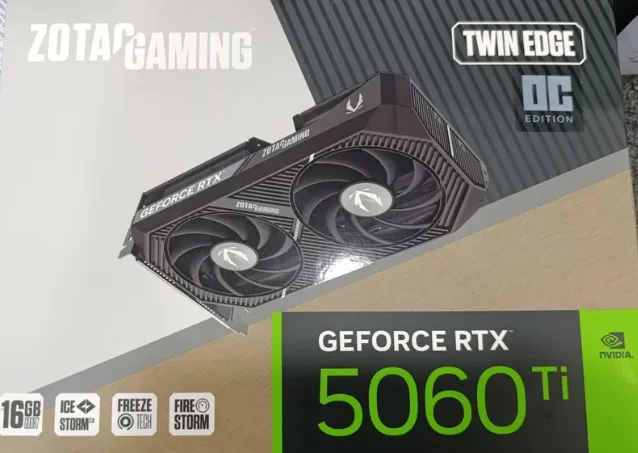
One thing that confuses people when they first shop for a card: NVIDIA designs the GPU, but it is usually not the company whose name is on the box. Board partners such as ZOTAC, ASUS, MSI, Gigabyte, Palit and Colorful buy the chip and build their own cards around it, with different coolers, clock speeds and warranties. The memory and the core count come from NVIDIA; the fans and the price do not.
| GeForce card | Memory | Memory bandwidth |
|---|---|---|
| RTX 5090 | 32 GB GDDR7 | ~1.79 TB/s |
| RTX 5080 | 16 GB GDDR7 | ~960 GB/s |
| RTX 5070 Ti | 16 GB GDDR7 | — |
| RTX 5070 | 12 GB GDDR7 | — |
| RTX 5060 Ti | 8 GB or 16 GB GDDR7 | — |
| RTX 5060 | 8 GB GDDR7 | — |
An entry-level RTX 5050 also sells in India, below the 5060.
The RTX 5090's 32 GB is the most memory you can get in an ordinary desktop graphics card, and it comfortably runs models up to around 30B at 4-bit. It will not run a 70B model on its own, and we will see why in the memory section below.
If you are buying a GeForce card mainly for AI rather than for games, the useful advice is simple: pick the card with the most memory you can afford, not the fastest one. An RTX 5060 Ti with 16 GB will run models that an RTX 5070 with 12 GB cannot, even though the 5070 is the faster card for gaming.
Tier 2 — NVIDIA RTX PRO: the workstation cards
These use the same chip family as the GeForce cards, but in a professional package: more memory, certified drivers, and a cooling design that lets you put several cards in one machine without them cooking each other.
This is the traditional route to more memory. You buy two or four cards and split the model across them. It works, it is well supported by every framework, and it is both expensive and power-hungry.
Tier 3 — DGX Spark and RTX Spark: the new desk-sized middle
This tier did not exist two years ago and it has become popular very quickly. It is where most of those Reddit photos come from.
DGX Spark is a small desk machine built on the GB10 Grace Blackwell Superchip, with up to 128 GB of unified memory. A 64 GB version starts at $4,999. NVIDIA says one 64 GB unit can run models of up to 100 billion parameters, and two linked units up to 200 billion.
RTX Spark, announced with Microsoft on 7 October 2026, puts the same idea into ordinary Windows laptops and compact desktops. The superchip pairs a Blackwell RTX GPU of up to 6,144 cores with a Grace CPU of up to 20 cores, connected at 600 GB/s, with up to 128 GB of unified memory and up to one petaflop of FP4 performance. Laptops ship from 16 October 2026 through Acer, ASUS, Dell, HP, Lenovo, Microsoft, MSI and Gigabyte, with compact desktops in November.
NVIDIA also previewed DGX Station for Windows, a deskside machine on the GB300 Grace Blackwell Ultra superchip with 748 GB of coherent memory and up to 20 petaFLOPS of FP4.
One caution about that petaflop figure. FP4 means four-bit numbers, the smallest unit these chips can count in, so "one petaflop of FP4" cannot be compared with a petaflop quoted at higher precision. It is a real number, measured in the most flattering unit available.
Tier 4 — L4, L40S and the data centre cards you rent
This is the tier that answers the Colab question, and it is the one almost nobody buys but almost everybody uses. When you pick a GPU type in Colab, or on a cloud provider, this is the menu you are choosing from.
| Card | Memory | Memory bandwidth | What it is for |
|---|---|---|---|
| L4 | 24 GB GDDR6 | ~300 GB/s | the cheap, low-power inference card; video and small models |
| L40 | 48 GB GDDR6 | ~864 GB/s | graphics plus AI, in a standard server |
| L40S | 48 GB GDDR6 | ~864 GB/s | the L40 tuned for AI; the value pick for inference |
| A100 40GB / 80GB | 40 or 80 GB HBM2e | up to ~2.0 TB/s | the previous generation workhorse, still everywhere |
| H100 SXM | 80 GB HBM3 | ~3.35 TB/s | the card that trained most of today's models |
| H100 NVL | 94 GB HBM3 | — | an H100 variant with more memory, tuned for LLM serving |
| H200 SXM | 141 GB HBM3e | ~4.8 TB/s | more memory and bandwidth than the H100 |
| B200 | ~192 GB HBM3e | ~8 TB/s | the Blackwell generation |
| GB300 Grace Blackwell Ultra | 288 GB | ~8 TB/s | Blackwell Ultra, with a Grace CPU attached |
From the second half of 2026, the Vera Rubin generation arrives with HBM4 memory, pushing per-GPU memory and bandwidth higher again.
A few things are worth understanding about this table.
The letter tells you the job. The L-series (L4, L40, L40S) are built on the same graphics-capable architecture as GeForce cards, use ordinary GDDR memory, draw less power, and fit in a normal server. The A, H and B series use HBM, a much faster and much more expensive kind of memory stacked right next to the chip, and they are built for training and heavy serving.
SXM and NVL and PCIe are form factors, not performance tiers. An "H100 SXM" is an H100 on NVIDIA's own socket, which allows faster links between GPUs. A PCIe version is a card you slot into a normal server. NVL is a variant with more memory for language-model serving. When a cloud provider makes you choose between them, SXM is generally the faster option for multi-GPU work.
This is what your API calls run on. When you pay a fraction of a cent for a question to a frontier model, it is being answered by one of the bottom rows of this table, shared between thousands of people. That sharing is exactly why renting is so much cheaper than buying.
NVIDIA GeForce GPU price in India
Prices move constantly and board partners set their own, so these are NVIDIA's own starting prices for India and the floor rather than what you will actually pay.
| GeForce card | Memory | Starting price (India) |
|---|---|---|
| RTX 5090 | 32 GB | Rs 2,39,000 |
| RTX 5080 | 16 GB | Rs 1,19,000 |
| RTX 5070 Ti | 16 GB | Rs 82,000 |
| RTX 5070 | 12 GB | Rs 66,000 |
| RTX 5060 Ti | 8 or 16 GB | Rs 42,000 |
| RTX 5060 | 8 GB | Rs 33,000 |
Read that table next to the memory table further down and the value question becomes clear. The RTX 5090 costs roughly seven times the RTX 5060 and gives you four times the memory. For gaming that premium buys a great deal of speed. For running a model, memory is what you are actually buying, so the mid-range cards often make more sense than the flagship.
You can check current listings on NVIDIA's India marketplace.
What AMD, Intel, Apple and Google build
NVIDIA is not the only option, although it is the one that everybody writes software for, through CUDA.
| Company | What they make | Where it fits |
|---|---|---|
| AMD | Radeon RX gaming cards, Radeon AI PRO workstation cards, and Instinct accelerators for data centres | the genuine alternative; see below |
| Intel | Arc consumer graphics and Gaudi AI accelerators | a cheap entry point, with a smaller ecosystem |
| Apple | M-series chips with unified memory | the surprise contender for local AI |
| TPUs | rent only, through Google Cloud; you cannot buy one | |
| Amazon | Trainium and Inferentia | rent only, through AWS |
| Qualcomm | mobile and laptop NPUs | on-device AI in phones and thin laptops, not large models |
The pattern worth noticing is that Google and Amazon build chips they never sell. They are not competing for space on your desk. They are competing on what it costs them to answer your API call.
AMD Radeon: the real alternative to NVIDIA
AMD is the only company selling cards you can actually put in your own desktop as a direct substitute for a GeForce card. The current desktop generation is RDNA 4, sold as the Radeon RX 9000 series.
| AMD card | Memory | Notes |
|---|---|---|
| Radeon RX 9070 XT | 16 GB GDDR6 | the top RDNA 4 desktop card, 64 compute units |
| Radeon RX 9070 | 16 GB GDDR6 | the same chip with 56 compute units |
| Radeon RX 9070 GRE | 12 GB GDDR6 | a cut-down version |
| Radeon RX 9060 XT | 8 GB or 16 GB GDDR6 | the entry card; take the 16 GB one for AI work |
| Radeon RX 9060 | 8 GB GDDR6 | the cheapest of the series |
| Radeon AI PRO R9700 | 32 GB GDDR6 | a workstation card built for local AI, with 128 matrix cores |
The Radeon AI PRO R9700 is the interesting one for anybody reading this article. It carries 32 GB, the same as an RTX 5090, in a workstation card aimed specifically at running models locally.
Above the desktop, AMD's Instinct line competes directly with NVIDIA's data centre parts: the MI355X with 288 GB of HBM3e, and the MI400 series due in 2026 with 432 GB of HBM4 and 23.3 TB/s of bandwidth.
So should you buy AMD? On hardware, AMD is genuinely competitive, and sometimes it gives you more memory per rupee. The gap is software. Nearly every AI library is written against CUDA first and AMD's ROCm second, which means that on AMD you will occasionally hit a tool that does not work yet, or works only after extra setup, and you will find fewer people online who have hit the same problem. Running a model through Ollama or llama.cpp on AMD is fine today. Research code and the newest training tricks are where you will feel the difference.
You can see the current desktop range on AMD's Radeon page.
What are Apple's M-series chips?
This one confuses people, so it is worth going slowly. Apple does not sell graphics cards at all. And yet a Mac Studio is one of the most capable machines you can buy for running large models locally. How is that possible?
Unified memory. In a normal PC, the GPU has its own small and very fast memory, the VRAM, which is separate from the computer's main RAM. The 32 GB on an RTX 5090 is a hard ceiling for the GPU, no matter how much system RAM the machine has, because moving data between the two is slow.
Apple builds the CPU, GPU and memory onto one package that shares a single pool. There is no "GPU memory" and "system memory"; there is just memory, and the GPU can use nearly all of it.
The result is striking. From Apple's own Mac Studio page:
| Chip | CPU | GPU | Unified memory | Bandwidth |
|---|---|---|---|---|
| M5 Max | 18-core | up to 40-core | up to 128 GB | up to 614 GB/s |
| M5 Ultra | up to 36-core | up to 80-core | up to 512 GB | 1.2 TB/s |
512 GB of memory available to the GPU, in a machine that sits on a desk and draws a fraction of the power of an equivalent multi-GPU rig. Apple markets it at exactly this use, saying you can "Run frontier-class AI models entirely on device", and naming Gemma, Kimi and Mistral. Reporting puts the M5 Max Mac Studio at around $2,499 and the M5 Ultra at around $5,499, with the 512 GB configuration arriving in late October 2026.
NVIDIA vs AMD vs Apple: which one should you pick?
Three different companies, three different bets, and the right answer depends entirely on what you are doing.
| NVIDIA | AMD | Apple | |
|---|---|---|---|
| Most memory on a desktop card | 32 GB (RTX 5090) | 32 GB (Radeon AI PRO R9700) | 512 GB unified (M5 Ultra) |
| Software support | best, by a distance (CUDA) | good and improving (ROCm) | good for running, patchier for training |
| Power draw | high | high | low |
| Price for the memory | highest | often better than NVIDIA | best at the top end |
| Can you train on it? | yes, this is its home ground | yes, with more setup effort | fine-tuning yes, serious training no |
| Best for | anyone who wants everything to just work | value, and people happy to tinker | running very large models quietly |
The short version of this table:
- Choose NVIDIA GeForce if you want the least friction, you also play games, or you are following tutorials that assume CUDA. This is the safe default for a student.
- Choose AMD Radeon if you want more memory for the money and you are comfortable solving the occasional setup problem yourself.
- Choose Apple if your priority is running the biggest possible model on a quiet desk machine, and you are not planning to train anything serious.
- Choose none of them and rent if you are still learning, which is most people reading this. More on that at the end.
The memory requirement for LLM
Now that the hardware is sorted out, here is the rule that actually decides which of it you need:
The model's weights have to fit in memory before it can run at all.
To run an LLM locally without pain, the model's weights have to load fully into memory. If they do not fit, the machine either refuses outright, or it starts shuffling data back and forth to system RAM, which is so slow that the model stops being useful.
So the question that drives the choice of GPU is never "how fast is this GPU". It is how much memory does it have, and how big is the model.
The rule of thumb
We are about to touch some fairly technical parts of how LLMs work, but you do not need to worry about the details here. Just understand that these are tricks for making models smaller and faster without losing much quality. If you are curious, we have linked our own lessons so you can go deeper.
A model's size in memory depends on how many parameters it has and how many bits each parameter is stored in. At 4-bit quantisation, which is the common setting for running models locally, a workable estimate is:
about 0.6 GB of memory per billion parameters
So a 70-billion-parameter model needs roughly 42 to 46 GB once you allow for overhead. At 8-bit it is about double, and at full 16-bit precision about 140 GB.
| Model size | 4-bit (Q4) | 8-bit (Q8) | 16-bit (FP16) |
|---|---|---|---|
| 7B | ~5 GB | ~8 GB | ~14 GB |
| 13B | ~9 GB | ~14 GB | ~26 GB |
| 70B | ~43 GB | ~75 GB | ~141 GB |
| 120B | ~70 GB | ~130 GB | ~240 GB |
This table tells you two things immediately. A 7B model runs on almost any modern gaming GPU, including an 8 GB RTX 5060. And a 70B model does not fit on a single RTX 5090, no matter how much you spend on a faster consumer card, because the limit is capacity and not speed.
Put the earlier tables beside this one and the whole article comes together. A 70B model at 4-bit needs about 43 GB, so your options are two GeForce cards, a Radeon AI PRO, a 128 GB Spark machine, a Mac Studio, or an hour on a rented L40S.
The cost everyone forgets: the KV cache
The weights are not the only thing sitting in memory. As a conversation gets longer, the model keeps a growing scratchpad of its earlier work called the KV cache, and it grows with the length of the context. A model that fits comfortably with 2,000 tokens of context may not fit at 100,000. Always budget some headroom beyond the table above, and see the KV cache for what it actually holds.
Quantisation is the lever that makes all of this possible, and it is worth understanding rather than just switching on. Why low precision explains the trade-off, and you can watch precision drop in the quantisation tab of our transformer simulator.
"Finally training my own LLM" — three different jobs
Now we can come back to that Reddit caption, because it hides the most expensive misunderstanding in this whole topic. "Training a model" gets used for three completely different jobs that need completely different hardware.
| What you are doing | What it means | What it needs |
|---|---|---|
| Running (inference) | using a model someone else trained | enough memory to hold the weights; a desk machine is fine |
| Fine-tuning | adjusting an existing model on your own data | more memory than running, but techniques like LoRA bring it within reach of a good desk machine |
| Pre-training | building a model from scratch | thousands of data centre GPUs running for weeks, costing millions |
Nobody is pre-training a frontier LLM on a desk. Not on a DGX Spark, not on a 512 GB Mac Studio, not on four RTX 5090s. Those machines do the first two rows.
That is not a criticism of them. Running a 100B model privately on your own hardware is genuinely useful, and fine-tuning a small model on your own data is a real, achievable weekend project. But if the picture in your head is "train my own GPT", then hardware is not the obstacle you think it is, and buying a box will not get you there.
So how do you actually host a model locally?
The software side is much easier than the hardware side, and it is mostly free.
- Ollama — the simplest way to start. Install it, run one command, and the model is downloaded and served on your machine with an API.
- LM Studio — a graphical application, if you would rather click than type. Good for browsing and testing models.
- llama.cpp — the engine underneath much of the above. It runs on almost anything, including CPU only, and it is where quantisation formats like Q4_K_M come from.
- vLLM — for serving a model to many users at once, with far better throughput. This is the production option, and it wants a proper GPU.
All of them read the same quantised model files, so the memory table above applies whichever one you choose.
CPU-only is possible, and worth knowing about. A 70B model at Q4 will run on a machine with 64 GB of system RAM and no GPU at all. It will be slow enough to test your patience, but it works, and it costs nothing to try before you spend money on hardware.
Should you buy any of this?
Renting a frontier model through an API costs a fraction of a cent per question. A Rs 4,00,000 machine has to replace an enormous amount of API usage before it pays for itself, and the model you run on it will still not be as good as the frontier model you could have rented. Our guide to API versus subscription works through that arithmetic.
Buying makes sense for three specific reasons, and you should be able to say which one applies to you:
- Privacy. The data cannot leave your building. This is the strongest reason, and it is often a legal requirement rather than a preference.
- Volume. You run so many requests that per-token billing has stopped making sense.
- Learning. You want to understand the machinery and not just call it. A cheap GPU and a 7B model will teach you more than an expensive one and a 70B.
If none of those is true, rent. Start with a free API tier or Colab, learn what actually limits inference, and buy hardware when you can point at the specific thing that renting will not let you do.
Common questions
What are the different types of NVIDIA GPU?
Four tiers. GeForce RTX cards for gaming and learning, RTX PRO cards for workstations, DGX Spark and RTX Spark machines for running big models on a desk, and the data centre range of L4, L40S, A100, H100, H200 and B200 that you rent by the hour rather than buy.
What is the difference between the L4, L40 and L40S?
All three are data centre cards built on a graphics architecture with ordinary GDDR memory. The L4 is the small, low-power one with 24 GB, meant for cheap inference. The L40 and L40S both carry 48 GB, and the L40S is the version tuned for AI work rather than graphics.
How much VRAM do I need to run a large language model?
As a rule of thumb, about 0.6 GB per billion parameters at 4-bit quantisation. A 7-billion-parameter model needs roughly 5 GB, and a 70-billion-parameter model roughly 43 GB. Add headroom on top for the KV cache, which grows as the conversation gets longer.
Can a GeForce RTX 5090 run a 70B model?
Not on its own. The RTX 5090 has 32 GB of memory and a 70B model needs around 43 GB at 4-bit, so you would need two cards, a machine with unified memory such as a Mac Studio or an RTX Spark system, or a smaller model.
What is the price of an NVIDIA GeForce GPU in India?
NVIDIA's starting prices run from about Rs 33,000 for an RTX 5060 to Rs 2,39,000 for an RTX 5090, with the RTX 5070 at Rs 66,000 and the RTX 5080 at Rs 1,19,000. Board partners set their own prices above those floors, so actual retail prices are usually higher.
Is AMD a real alternative to NVIDIA for AI?
On hardware, yes. The Radeon AI PRO R9700 offers 32 GB for local AI, and the Instinct MI355X carries 288 GB. The gap is software: most AI libraries target NVIDIA's CUDA first, so AMD can mean extra setup work and fewer people online who have solved the same problem.
Why is Apple good at local AI without making a graphics card?
Because of unified memory. Apple puts the CPU, GPU and memory on one package sharing a single pool, so the GPU can use nearly all of the machine's memory. An M5 Ultra Mac Studio can be configured with up to 512 GB available to the GPU, where a desktop graphics card tops out at 32 GB.
Can you train an LLM on a DGX Spark or a Mac Studio?
You can fine-tune an existing model and you can run very large ones. You cannot pre-train a frontier model from scratch, which takes thousands of data centre GPUs running for weeks. Most people who say they are training a model locally are either fine-tuning or simply running one.
What does FP4 mean, and is one petaflop of FP4 impressive?
FP4 means numbers stored in four bits, the smallest unit these chips handle. A petaflop of FP4 is a real measurement, but it is not comparable with a petaflop quoted at 8-bit or 16-bit precision, so only compare headline figures when they use the same precision.
Can I run a model without a GPU at all?
Yes. llama.cpp and Ollama will run on the CPU using system RAM, and a 70B model at 4-bit works on a machine with 64 GB of RAM. It is slow, but it costs nothing to try, and it is a sensible way to find out what you actually need before buying hardware.
The short version
- NVIDIA has four tiers: GeForce RTX for gaming and learning, RTX PRO for workstations, DGX and RTX Spark for the desk-sized middle, and L4 to B200 in the data centre, which you rent.
- The GPU in your Colab dropdown is a rented data centre card, usually something like an L4 or an A100, not anything you would have at home.
- Memory decides everything. Work out the model size first, then choose the hardware.
- About 0.6 GB per billion parameters at 4-bit, plus headroom for the KV cache.
- Buy memory, not speed. A 16 GB mid-range card beats a faster 12 GB one for AI work.
- AMD is competitive on hardware, and behind on software. Apple competes through unified memory, not through a graphics card.
- Running, fine-tuning and pre-training are three different jobs. The box on the desk does the first two.
- Rent before you buy, unless privacy, volume or deliberate learning says otherwise.