You tell a restaurant assistant: "I'm vegetarian and I can't handle spicy food." It recommends three mild vegetarian places. The next day you ask, "Suggest somewhere for dinner," and it suggests a fiery barbecue joint. Technically it answered. Practically, it failed, because it does not remember you, so you would have to explain yourself again in every conversation.
Contrast that with an assistant that greets you with "Want something mild and vegetarian again, or are you exploring?" The difference is memory, and adding it uses ideas you already know from RAG, pointed at a different source.
Memory is RAG over your own history
A RAG system retrieves from a document store. A memory-enabled assistant also retrieves from a memory store: facts, experiences and preferences gathered from past conversations with this user. The loop is:
- The user asks something.
- The system retrieves relevant memories for this user, as well as documents.
- The model answers using the question, the documents and the memories.
- The system extracts anything new worth remembering from the exchange and writes or updates the memory store.
Steps 2 and 3 are familiar RAG. Step 4 is new: the assistant writes its own knowledge base as it goes.
Short-term and long-term memory
- Short-term (thread) memory is the conversation so far: the message history kept in the agent's state within one session. It is what lets "and for managers?" make sense after a question about notice periods. It ends with the session, or gets summarised when it grows too long.
- Long-term memory persists across sessions, attached to the user. This chapter is about long-term memory.
Three kinds of long-term memory
The standard division borrows from cognitive psychology.
Semantic memory: facts
What is true about the user (and their world)? "Works as a GenAI engineer at Acme Retail." "Uses LangGraph and Pinecone." "Prefers Python." "Works in IST hours." Semantic memories are durable facts that let the assistant tailor answers without being told again. A question about deploying a RAG pipeline gets an answer in Python with Pinecone examples, scheduled for IST.
Episodic memory: experiences
What happened before? "Last week the user lost hours on a SQL bug because they forgot a GROUP BY clause." When the same user later says, "I'm stuck on a SQL query again," an assistant with episodic memory asks, "Did you check the GROUP BY this time?" Episodes are specific events with context, and they let the assistant draw on shared history: a goal the user mentioned ("I'm aiming for an architect role"), a trip they were planning, a decision taken in an earlier conversation.
Procedural memory: how to behave
How does this user want the assistant to act? A user tells a writing assistant twice: "no long paragraphs and special characters, give me bullet points." From then on it uses bullet points without being asked. Procedural memory is learned behaviour: format preferences, tone, escalation rules ("ask before booking anything"), how to close a conversation. It usually comes from feedback, and it often changes the assistant's instructions (system prompt) rather than being retrieved as a fact.
The difference between episodic and procedural is the most commonly confused point. Episodic memory stores what happened ("the user planned a Paris trip for next week"), while procedural memory stores how to act ("the user wants answers as bullet points"). One is recalled as context, and the other reshapes behaviour.
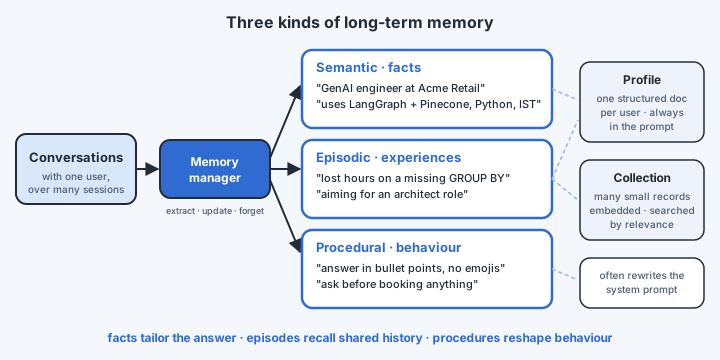
How memories are organised
- Profile: a single structured document per user with a fixed schema (name, role, organisation, expertise, preferred language, time zone), updated in place. It is compact and always fully loaded, so it suits stable key facts. A relational or document database (or a key-value store) works well.
- Collection: an open-ended set of individual memory records, each a short piece of natural language with metadata, embedded and searched by similarity to the current conversation. It suits the growing, varied pile of facts and episodes, too many to load at once. A vector store works well.
Most systems use both: a profile that is always in the prompt, and a collection searched for what is relevant right now.
Three design decisions
What to remember
Not everything. A greeting, a one-off question about the solar system, or the user's frustration about a slow Wi-Fi connection is mostly noise. Storing it all bloats the memory and pollutes retrieval. Define what is worth extracting: stable facts, explicit preferences, goals and decisions, corrections and feedback. A memory manager (an LLM step with a clear instruction and schema) decides.
When to write: hot path or background
- Hot path: the agent writes memories during the conversation, typically by calling a "save memory" tool as it goes. New information is available at once, even later in the same chat. The cost is extra latency and tool calls inside the user's turn, and the agent must remember to call the tool.
- Background: after the conversation, or after a quiet period, a separate process reads the transcript and extracts memories. It adds no latency to the conversation and can consider the whole exchange at once, which gives better judgement. The cost is that memories arrive late.
The next chapter shows both, side by side.
How to update and forget
Memory is not append-only. "I work at Infosys" in January is replaced by "I just joined Acme Retail" in June, so the system must update, not keep both contradictory facts. Some memories should expire, such as "I'm travelling next week". Users should be able to see and delete what is remembered about them. Good memory managers consolidate (merge, update, delete) rather than only appending, and every stored memory carries a timestamp.
A memory store is a profile of a person built from their conversations, which may include health, employment or family details. Treat it like any personal-data store: tell users what is remembered, let them view and delete it, scope it strictly to the user (as with tenant isolation), apply retention limits, and never let one user's memories reach another user's prompt.